Hunt without opening the app.
Antlr lives where iPhone already puts things: Siri, the Lock Screen, the Dynamic Island, widgets, Control Center and your Apple Watch. Ask for the wind, log a deer and watch the light run down without opening Antlr.
Ask. Keep your hands on the bow.
Siri answers from your own stands, plans, sits and armory, and speaks it so you don’t have to look. Most answers come with a card for when you do.
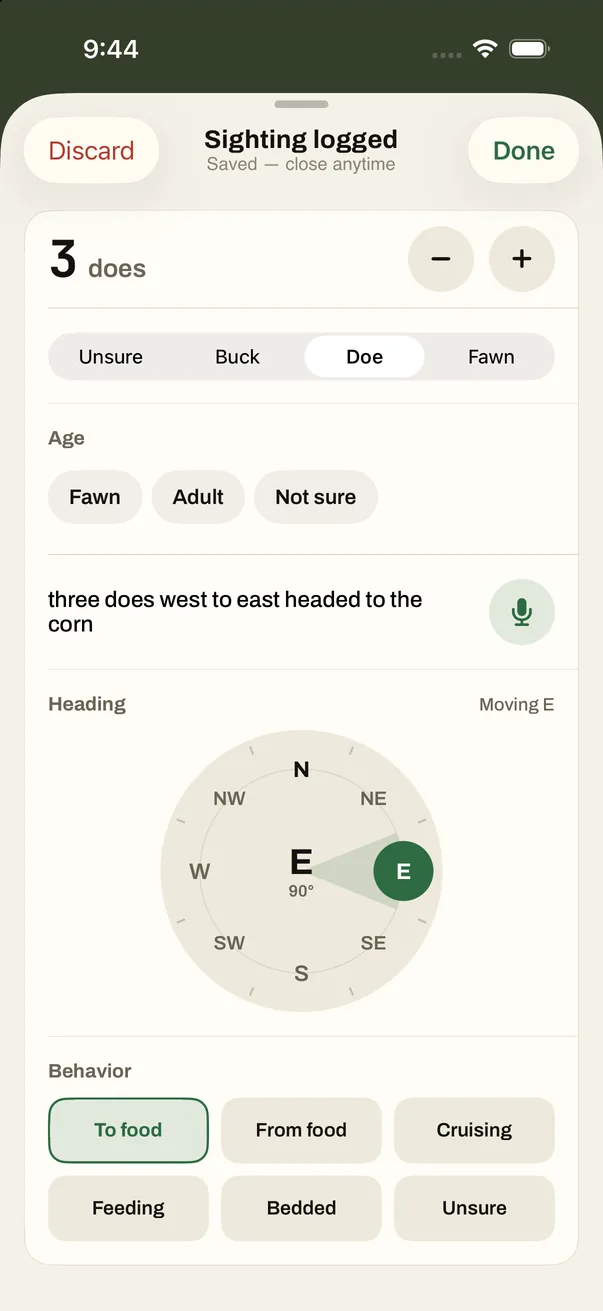
- Say what you saw. Dictate a sighting and Antlr fills in the count, the sex, which way they went and what they were doing. On iPhones with Apple Intelligence, that’s worked out on the phone itself.
- It knows which stand you mean. With a stand open in Antlr, Siri knows the one on your screen.
- Private on a locked phone. Your sits, plans and armory need the phone unlocked. Turn on Hide stand names on the Lock Screen and Siri says “your stand” instead.
“Which stand this evening in Antlr?”
This evening the wind fits Big Oak best, then Creek bottom blind. Fence line ladder has it at your back.
“What’s my hold with the Ruger in Antlr?”
How far, in yards?
“250.”
At 250 yards with your Ruger, it drops 7.7 inches. Hold on the hairline at the top of the back. Or dial 3.0 minutes of angle up.
“Log a doe in Antlr.”
Logged a doe at Big Oak.
Just say it, and end with “in Antlr.”
- Before: “Which stand this evening in Antlr”
- Before: “What’s my hunt plan in Antlr”
- Before: “When do I leave camp in Antlr”
- In the stand: “Start a sit at Big Oak in Antlr”
- In the stand: “Log a doe in Antlr”
- In the stand: “How much daylight is left in Antlr”
- In the stand: “What’s my hold with the Ruger in Antlr”
- After: “End my sit in Antlr”
- After: “How did my last sit go in Antlr”
- Gear: “Ask Antlr who has my gear”
- Gear: “Ask Antlr what needs replacing”
Works the day you install Antlr. Your own stand and weapon names work once Antlr has loaded them.
The sit stays on your Lock Screen.
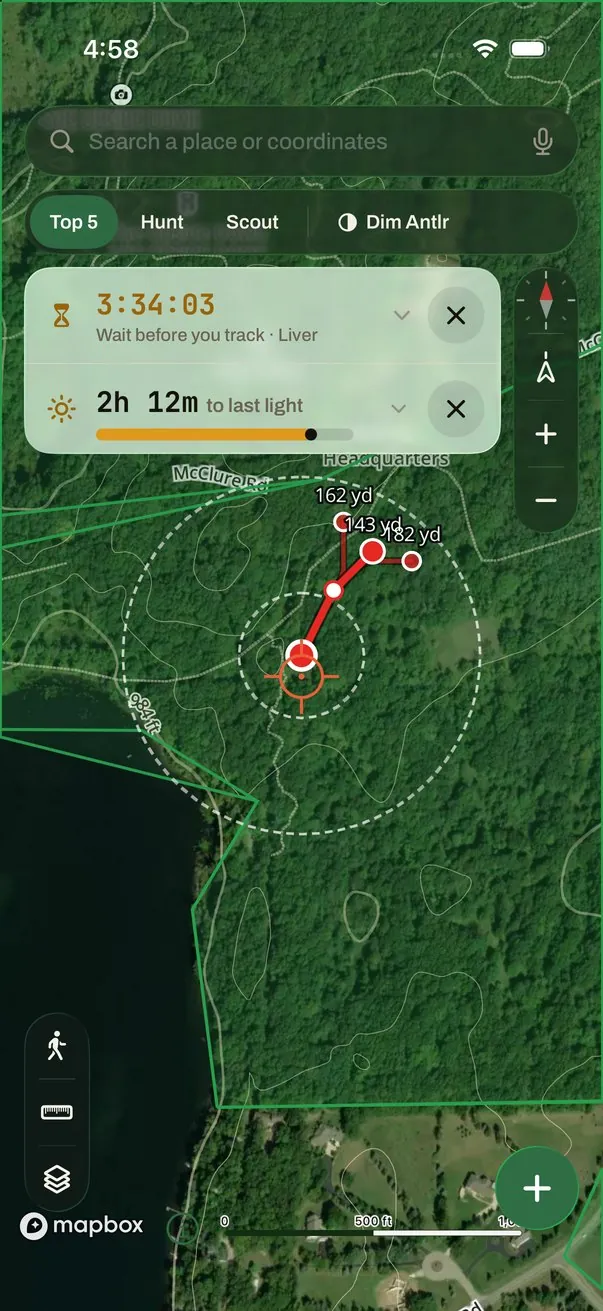
A card holds the moment you’re in: the walk in, the sit, the wait after the shot. It counts down on its own and logs from the Lock Screen, no unlocking.
On iOS 26, a card appears 30 minutes before your hunt plan’s leave-camp time and counts down, then to when you should be seated. Earlier iOS gets an alert 15 minutes before.
Tap Deer, Doe, Buck or Nothing without unlocking. The Dynamic Island keeps the wind and the countdown, and an alert comes 15 minutes before legal light ends.
Counts down the wait for the hit you picked and alerts you when it’s up. For waits of 3 hours or more on iOS 26, it can set an alarm that sounds even on silent.
Hunt from your wrist.
Pick a stand and start the sit on your watch. On a watch with a compass, the wind arrow turns as you do, so pointing straight down means it’s in your face. Log what you see with a tap, and when it’s over, a compass walks you back.
On your watch face, complications show the wind at your sit or your focus stand, whether it fits, and the countdown to light. No signal? Logs wait on your phone and send when you have it.
Know the wind before you get dressed.
Five widgets for the Home Screen and the Lock Screen. They read the forecast Antlr saved, so they keep working with no signal.
- Stand Wind
- The wind at your stand, whether it’s in your face, and time to legal light. Pick a stand, or let it follow your sit.
- Wind Fit
- Which of your stands the forecast wind suits this evening or tomorrow morning.
- Tomorrow Morning
- First light, the wind at sunrise and the stand it suits. Made for the nightstand.
- Camp
- Who from your camp is sitting, and where.
- Season So Far
- Sits, deer and bucks seen since August 1, and your last sit.
Ten things to say, and a button for the rest.
Each works the day you install Antlr, with no setup, and your stand and weapon names become part of the phrases. They’re all in the Shortcuts app too, ready to build into your own.
- Wind at a Stand “What’s the wind at Big Oak in Antlr”
- Which Stand “Which stand this evening in Antlr”
- Start a Sit “Start a sit at Big Oak in Antlr”
- Log a Sighting “Log a doe in Antlr”
- Daylight Left “How much daylight is left in Antlr”
- End My Sit “End my sit in Antlr”
- Hunt Plan “When do I leave camp in Antlr”
- My Sits “How did my last sit go in Antlr”
- Hold at Range “What’s my hold with the Ruger in Antlr”
- Ask My Armory “Ask Antlr who has my gear”
Control Center and the Action button
Add Log a Deer and the Sit switch to Control Center, or put one on the Action button and log without looking.
A Hunting Focus
Add Antlr’s filter to a Focus and only its hunt alerts come through: last light, leave camp, the blood-trail wait, and which way it went. Antlr’s other alerts wait in Notification Center.
Spotlight
Search your stands, your last 50 sits and 30 plans from the Home Screen, and tap to open one. Turn it off in Antlr’s settings and the index is cleared.
Glass over the map, not in the way.
On iOS 26, every control floating over the map is Liquid Glass, so the ground shows through. Buttons are 44 points, big enough for gloves. On earlier iOS, the same controls sit on frosted glass.
What works on which iPhone.
Apple, iPhone, Apple Watch and Siri are trademarks of Apple Inc., registered in the U.S. and other countries. Antlr isn’t made or endorsed by Apple.
- iOS 17 or later
- Siri and Shortcuts, the sit card and the recovery wait card, all five widgets.
- iOS 18
- Control Center and the Action button, and Spotlight search. Siri knowing which stand is open needs iOS 18.2.
- iOS 26
- Liquid Glass, the leave-camp card, the recovery alarm that sounds on silent, and terrain scans and hunt plans that keep running on the Lock Screen.
- Apple Intelligence
- Spoken sightings filled in on the phone itself. Other iPhones fill them in by matching words.
- Apple Watch
- watchOS 10 or later, paired with an iPhone that has Antlr.
Keep your eyes on the woods.
[Free scans and trial terms]